Voice Minutes and Billing
What forwarded calls cost, how the voice add-on works and what the two overage switches do
Voice Minutes and Billing
Only the minutes you spend talking on a forwarded call cost anything.
- Ringing, the answer confirmation prompt and voicemails are all free
- Pay as you go at $0.20 a minute, with nothing to switch on
- Or add the $15 a month voice add-on for 100 forwarded minutes, which is cheaper above about 75 minutes
- Turn voice overage off and callers go to voicemail instead of running up minutes
- Voice overage and SMS overage are two separate switches
Everything on this page lives on the Voice Minutes & Usage card in Settings → Account & Billing, under the SMS card.
1. What Actually Costs Money
A minute is only counted when a forwarded call is connected and you are talking to the caller.
Free, always:
- Ringing. The time your mobile or landline rings before anyone picks up.
- The answer confirmation prompt. The moment where whoever answers presses a key.
- Voicemail. Recording a message, transcribing it and the AI summary all cost you nothing, no matter how long the message is.
- Calls in voicemail only mode. They are never forwarded, so there is nothing to bill.
Which means a number set to Voicemail only costs nothing at all to run. A number that forwards costs you only for the conversations you actually have.
2. Pay As You Go Is the Default
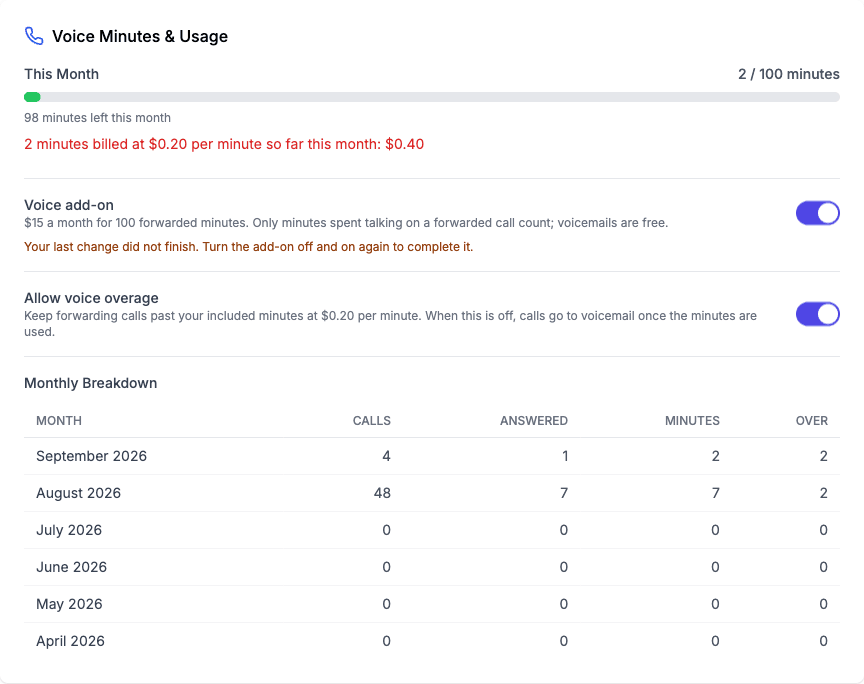
You do not have to switch anything on. Out of the box, forwarded minutes bill at $0.20 a minute on top of your plan. The card shows you the running total for the month:
12 minutes billed at $0.20 per minute so far this month: $2.40
That figure is what has actually been charged as each call finished. It is not an estimate that moves around when you change your settings later.
3. The Voice Add-On
$15 a month for 100 forwarded minutes. Optional.
The maths is simple: 75 minutes at $0.20 is $15. So if you regularly forward more than about 75 minutes a month, the add-on is cheaper. Under that, pay as you go is cheaper and you should leave the add-on off.
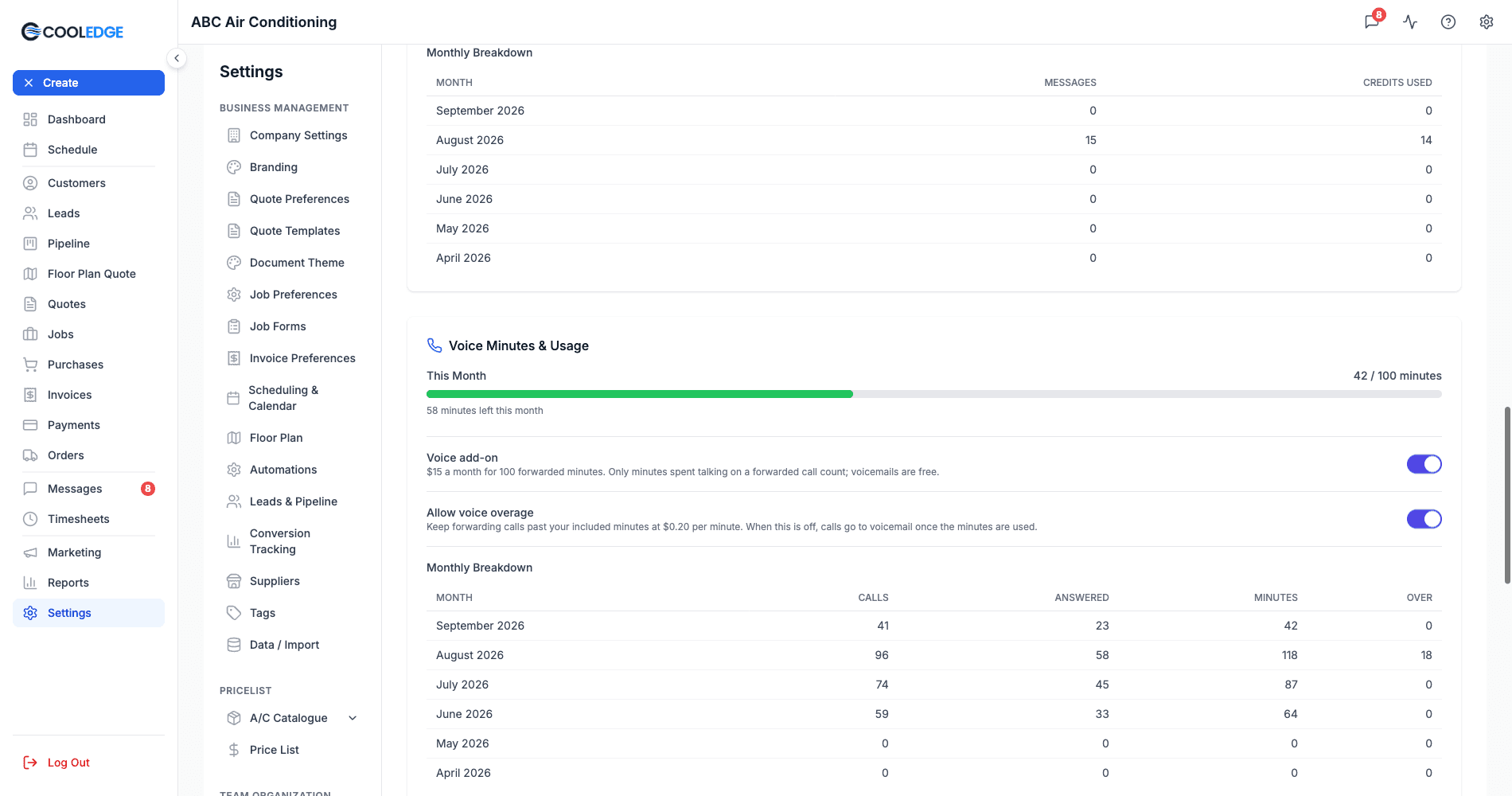
With the add-on on, the card shows a progress bar of your minutes used against the 100 included, plus how many are left. Without it, you just see how many minutes you have forwarded this month.
Turning it on
Only the account owner can. Flick the Voice add-on switch and confirm. The first month is charged straight away, pro rata, so you pay for the part of the month you are actually using.
If the card says Available on a paid plan instead of a switch, your business is not on an active paid plan yet. The add-on is on monthly plans for now, so a yearly subscription is told The voice add-on is available on monthly plans for now.
Turning it off
Also owner only. It takes effect immediately:
- Your included minutes drop to 0 straight away
- The unused part of the month is credited to your account
- Forwarded calls go back to billing at $0.20 a minute if voice overage is allowed or straight to voicemail if it is not
If a change does not finish
Occasionally a payment step does not complete and the card says Your last change did not finish. Turn the add-on off and on again to complete it. Do exactly that. If it says That change is already in progress, refresh and give it a moment.
4. Additional Numbers
Each extra number is its own line on your subscription: $7 a month for a local number and $15 a month for a mobile number. When you buy one, the first charge is prorated for the rest of the current billing period and lands on an invoice straight away. When you release one, the unused part of the month comes back as a credit on your next invoice. If you bought the number less than 30 days ago, the charge for this month is not refunded.
Forwarded minutes on an extra number count toward the same pool as your main number. The number itself is the only extra cost.
You can see every number and what it costs under Phone numbers on the Voice Minutes & Usage card.
5. Allow Voice Overage
The Allow voice overage switch decides what happens once your included minutes are gone. Owners only.
| Add-on | Voice overage | What happens |
|---|---|---|
| Off | On (the default) | Every forwarded minute bills at $0.20. |
| On | On | The first 100 minutes are included, then $0.20 a minute. |
| On | Off | Forwarding works until the 100 minutes are used, then callers go to voicemail until next month. |
| Off | Off | Calls are never forwarded. Every caller goes to voicemail. |
That last row catches people out. With the add-on off you have no included minutes, so turning overage off leaves nothing to forward with. The routing editor says so on the spot when you pick a forwarding mode, so you are not left guessing.
Nothing is lost either way. A caller who reaches voicemail still leaves a message, still gets a transcript and can still become a lead.
6. The Two Overage Switches Are Separate
CoolEdge has two overage switches and they do completely different jobs. Turning one off does not turn the other off.
| Switch | Governs |
|---|---|
| Allow voice overage | Whether calls keep being forwarded once your voice minutes are used up. |
| Allow SMS overage | Whether messages keep sending once your SMS credits are used up. |
The one place they meet is the missed-call text-back. That message is an ordinary SMS from your business number and it uses SMS credits like any other message, so whether it still sends after your credits run out is decided by your SMS overage setting, not your voice one. See Email and SMS Settings for the SMS side.
So a business that has turned voice overage off to cap its call spend still sends missed-call texts. A business that has turned SMS overage off still forwards calls.
7. How Minutes Are Counted
- Minutes are counted per calendar month, from the first of the month.
- Only inbound calls to your CoolEdge numbers count.
- Usage is shared across all your numbers. There is not a separate pool per number.
- The Monthly Breakdown table at the bottom of the card gives you the last six months: Month, Calls, Answered, Minutes and Over, so you can see the trend before deciding on the add-on.
8. Keeping the Bill Down
- Leave answer confirmation on. With it off, a call the forwarded phone's own voicemail picks up counts as answered and bills for a message your business never receives. See Call Forwarding and Voicemail.
- Keep Ring for short. You are not billed for ringing, but a long ring gives a carrier voicemail time to answer.
- Use business hours mode rather than always forwarding, so after-hours calls go to voicemail instead of ringing you.
- Check the Monthly Breakdown before you turn the add-on on or off. Six months of real numbers beats a guess.
- Watch Call History to see which number is generating the minutes. Labels make it obvious. See Call History.
9. Troubleshooting
The card says minutes are billed, but I never answer calls
Check answer confirmation on each forwarding number. With it off, calls picked up by the forwarded phone's carrier voicemail bill as answered calls.
My minutes went to 0 in the middle of the month
The add-on was turned off. That drops the included minutes immediately and credits the unused part. Turning it back on starts a fresh pro rata month.
Callers are going to voicemail even though forwarding is set up
Both switches are off: no add-on and no voice overage means no forwarding. Turn one of them on.
The switch is greyed out
Only the account owner can change either voice switch. The card says so under the add-on.
The dollar figure did not change when I turned the add-on on
It is not meant to. The amount shown is what was charged as each call finished, so a change you make today does not rewrite calls that already happened.
Next Steps: Set up forwarding in Call Forwarding and Voicemail or review your calls in Call History
Need help? Email us at support@cooledge.com.au
Was this article helpful?
Let us know if you found this information useful.
Still need help? Contact support
In this article
Use your browser's search (Ctrl+F) to quickly find specific topics within this article.
Browse all help articles →Related Articles
Booking Reminders
Automated SMS and email reminders that fire before every scheduled visit. Filter by staff, category, or visit type, with quiet hours and custom templates.
Call Forwarding and Voicemail
Forward calls from your business number to a mobile or landline, set business hours and record your voicemail greeting
Call History
See every call to your business number, who called, what happened and any voicemail they left