Subcontracted Installation
Quote a job a subcontractor installs for a fixed fee. Enter the fee, set the installation price and see your margin before you send.
Subcontracted Installation
Price a subbie's install in seconds and know exactly what you keep.
- Enter the subcontractor's fee and set the installation price the customer pays
- Mark the fee up by a percentage with one click
- The customer sees an ordinary installation price, with no mention of a subcontractor
- Your team in the mobile app sees the price, never the fee
- The fee flows into the quote's estimated profit and the job's profitability
When a subcontractor installs a system for a fixed fee, the usual installation pricing (materials, electrical and labour hours) doesn't describe your costs. Subcontracted installation lets you replace it with two figures: what the subbie charges you and what you charge the customer.
Which Quotes Have It
Subcontracted installation is in the portal, for owners and admins.
| Quote type | Where the card is |
|---|---|
| Split, Multi, VRV and Install Only | Edit Quote, in the right-hand column under Pricing Summary |
| Ducted | Edit Quote in the ducted editor, under Pricing Summary |
| Ducted (Floor Plan) and VRV (Floor Plan) | The quote builder step, under each option. Later, in the ducted or VRV editor |
| Ventilation and Subfloor Ventilation | The floor plan quote builder, when you create the quote or later through Edit Floor Plan |
It isn't available on repair, itemised or trade quotes.
Set It Up
- Open the quote in the editor
- Turn on Subcontracted installation
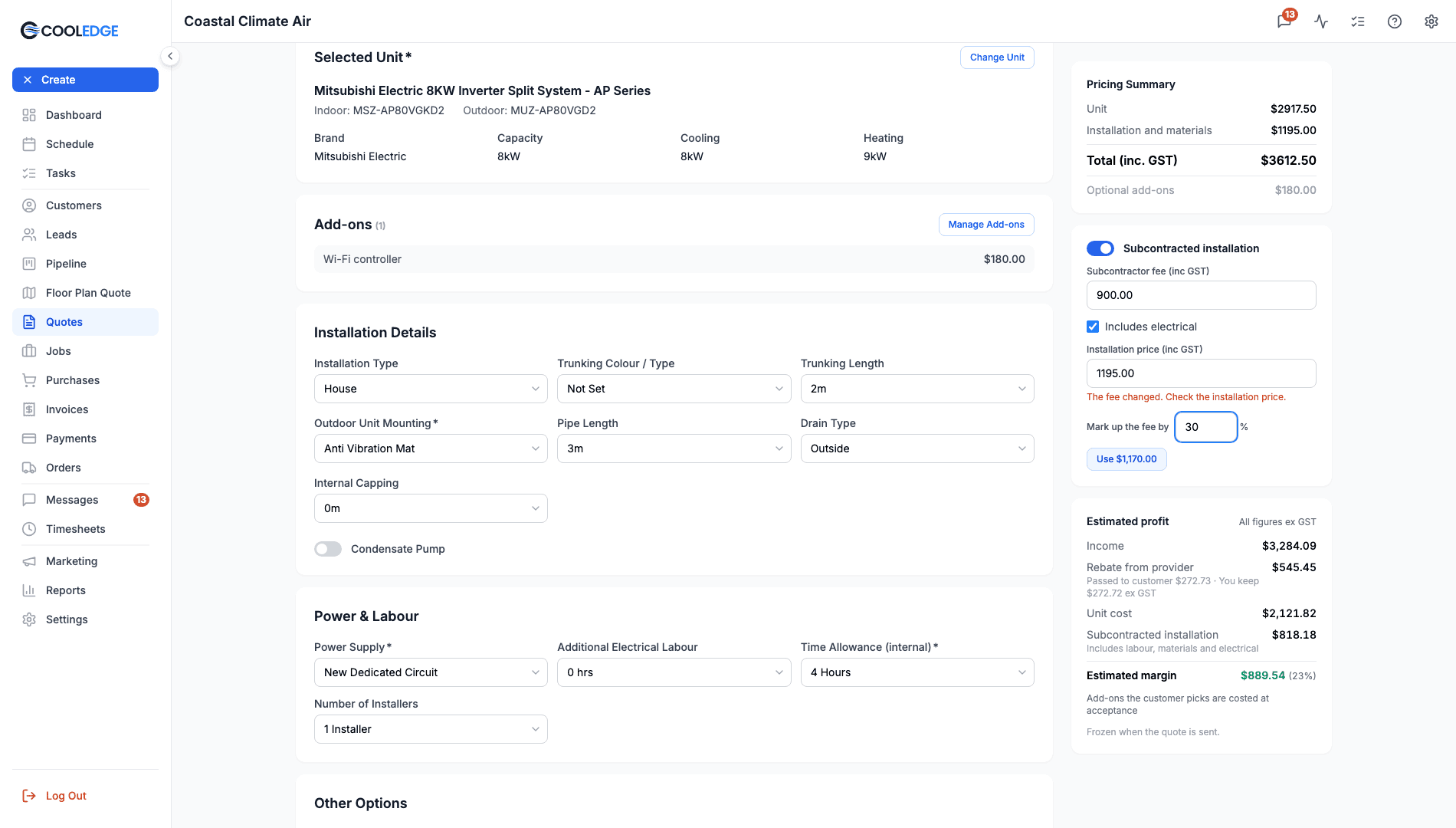
- Type the subbie's price in Subcontractor fee (inc GST)
- Leave Includes electrical ticked if the subbie's fee covers the electrical work. Untick it to keep electrical priced as usual
- Set Installation price (inc GST), what the customer pays for the installation. It starts at the option's current installation and electrical price, so the customer's total doesn't move until you change it
- Save the quote
Mark Up the Fee
To price from the fee, type a percentage in Mark up the fee by and click the button that appears. For example, 30% on a $900.00 fee shows Use $1,170.00. It fills in the installation price. The percentage isn't saved, so you can try a few.
When the Fee Changes
If you change the fee after setting the price, an amber warning says The fee changed. Check the installation price. Update the price, or click out of the price field, to clear it.
Once the customer accepts the quote, the fee can't change.
What the Customer Sees
An ordinary installation price. The quote page, the PDF and the preview never mention a subcontractor or the fee.
What Your Team Sees in the Mobile App
On the Installation step, a locked Installation card reads Installation price set by your office, with the price beside it. There's no fee and no mention of a subcontractor. Nobody can change subcontracted installation in the mobile app, owners included. Make changes in the portal.
Markup Sliders
If you allow markup adjustment on quotes (Settings > Quote Preferences), the Materials markup slider on a subcontracted option shows a note, because the installation price is now set by hand:
- Not used while the installation price is set by hand.
- Applies to electrical only while the installation price is set by hand. (when Includes electrical is unticked)
Some options also keep a construction charge or a bypass zone priced as usual and the note lists those too.
Your Margin on the Quote
In the Estimated profit block under the card, a subcontracted option shows a Subcontracted installation cost row for the fee. Its caption reads "Includes labour and materials", or "Includes labour, materials and electrical" when Includes electrical is ticked. Empty labour and materials rows are hidden. See Estimated Profit While You Quote.
If the switch is on but there's no fee, the estimate shows Estimate incomplete: the subcontractor fee is missing.
On the Job
When the quote is accepted, the job's Profitability card shows:
- Subcontractors: the fee as the estimate and bills in the Subcontractor category as the actual
- Labour: Subcontracted in the estimate when none of your own team's labour is left in it (untick Includes electrical and the electrical labour still shows as hours). Any hours your own team logs still show, for example "Subcontracted, 1.0 h on timesheets"
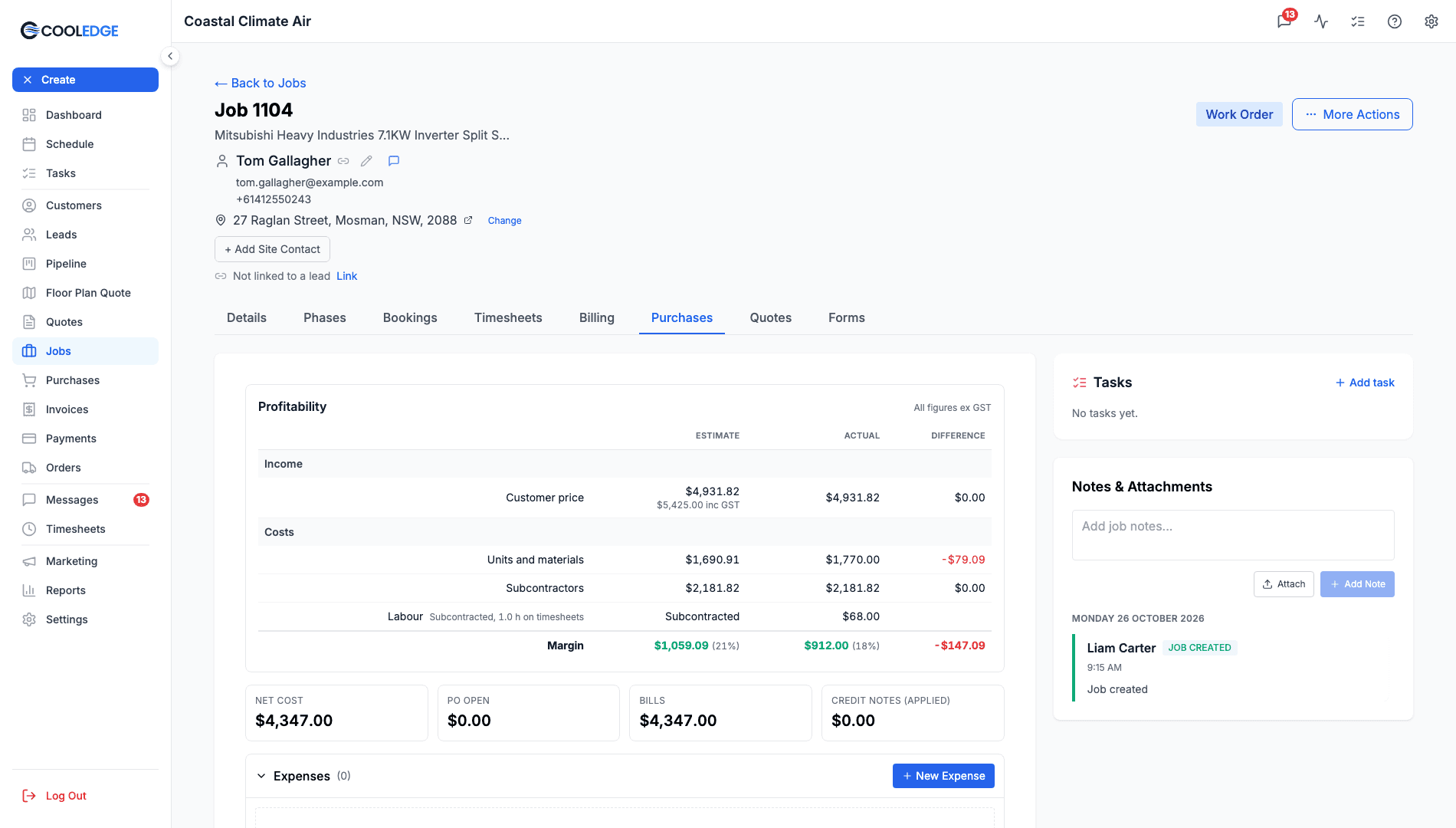
Tip: give the subbie's supplier record (for example Kelly Install Co) a Default category of Subcontractor. Every bill you enter from them then lands in the Subcontractors row without you picking it. See Managing Suppliers and Supplier Bills and Credit Notes.
Common Questions
Is the fee inc or ex GST? You type it inc GST. The estimate and the job card show it ex GST, like every other cost.
Can members see the fee? No. Members see only "Installation price set by your office" and the price.
Can I subcontract a repair or itemised quote? No. It's for split, multi, VRV, ducted, install only, ventilation and subfloor ventilation quotes.
Related Articles:
- Job Profitability: Compare your estimate with what actually happened
- Quoting Basics: Build and send quotes
- Supplier Bills and Credit Notes: Record the subbie's bill against the job
- Energy Rebates: Track rebates you claim from a provider
Need help with Subcontracted Installation? Email us at support@cooledge.com.au
Was this article helpful?
Let us know if you found this information useful.
Still need help? Contact support
In this article
Use your browser's search (Ctrl+F) to quickly find specific topics within this article.
Browse all help articles →Related Articles
Auto Duct Layout
Visual duct designer on the ducted floor plan wizard. Auto-route or draw by hand. Includes outdoor unit and refrigerant pipework. Drives the take-off.
Business Callouts (Why Choose Us)
Display trust-building callout points on your public quote pages to increase acceptance rates
Custom PDF Pages
Add professional cover pages, warranty info, maintenance plans and more to your quote and invoice PDFs