Review Widgets & Embedding
Learn how to embed review widgets on your website and display reviews on your quote pages
Review Widgets & Embedding
Showcase your Google reviews on your website and quote pages with customisable embeddable widgets. Build trust with potential customers by displaying your best reviews where they matter most.
Website Embed Widget
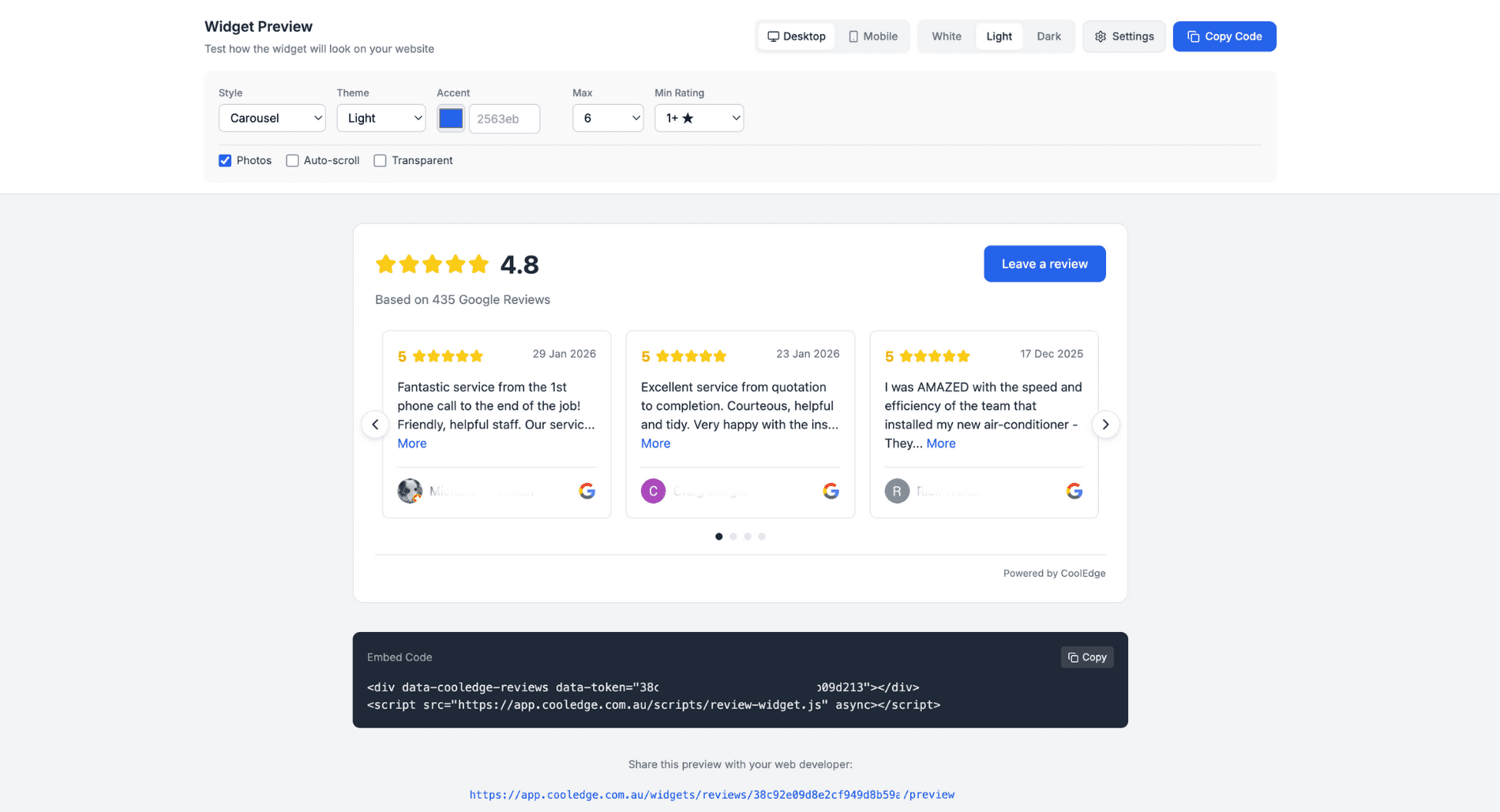
The website embed widget lets you display your Google reviews on any webpage.
Setting Up Your Website Widget
- Go to Marketing → Reviews in the portal
- Click the Embed tab
- Customise your widget appearance
- Copy the embed code
- Paste into your website's HTML
Widget Customisation Options
| Option | Description |
|---|---|
| Style | Carousel (auto-scrolling slides) or List (stacked) |
| Theme | Light or Dark background |
| Accent Colour | Highlight colour for buttons and stars |
| Font Family | Match your website fonts |
| Max Reviews | Number of reviews to display (3-30) |
| Min Rating | Only show 4+ or 5-star reviews |
| Show Photos | Display reviewer profile photos |
| Auto-Scroll | Carousel timing (2-15 seconds) |
| Transparent | Blend into any background |
| Leave Review Button | Include link for new reviews |
| Locations | Which Google locations the widget draws reviews from. Only shown once you have more than one |
| Write a review button links to | Which location the Leave a Review button sends people to |
Embed Code
Your embed code looks like this:
<div data-cooledge-reviews data-token="your-token-here"></div>
<script src="https://app.cooledge.com.au/widgets/reviews.js" async></script>
Important: The token is unique to your business. Don't share it publicly in places where it could be misused.
Where to Place Your Widget
- Homepage – Near the top for immediate social proof
- Service Pages – Show relevant reviews for specific services
- About Page – Build trust with your story + reviews
- Contact Page – Reassure customers before they reach out
Choosing Locations
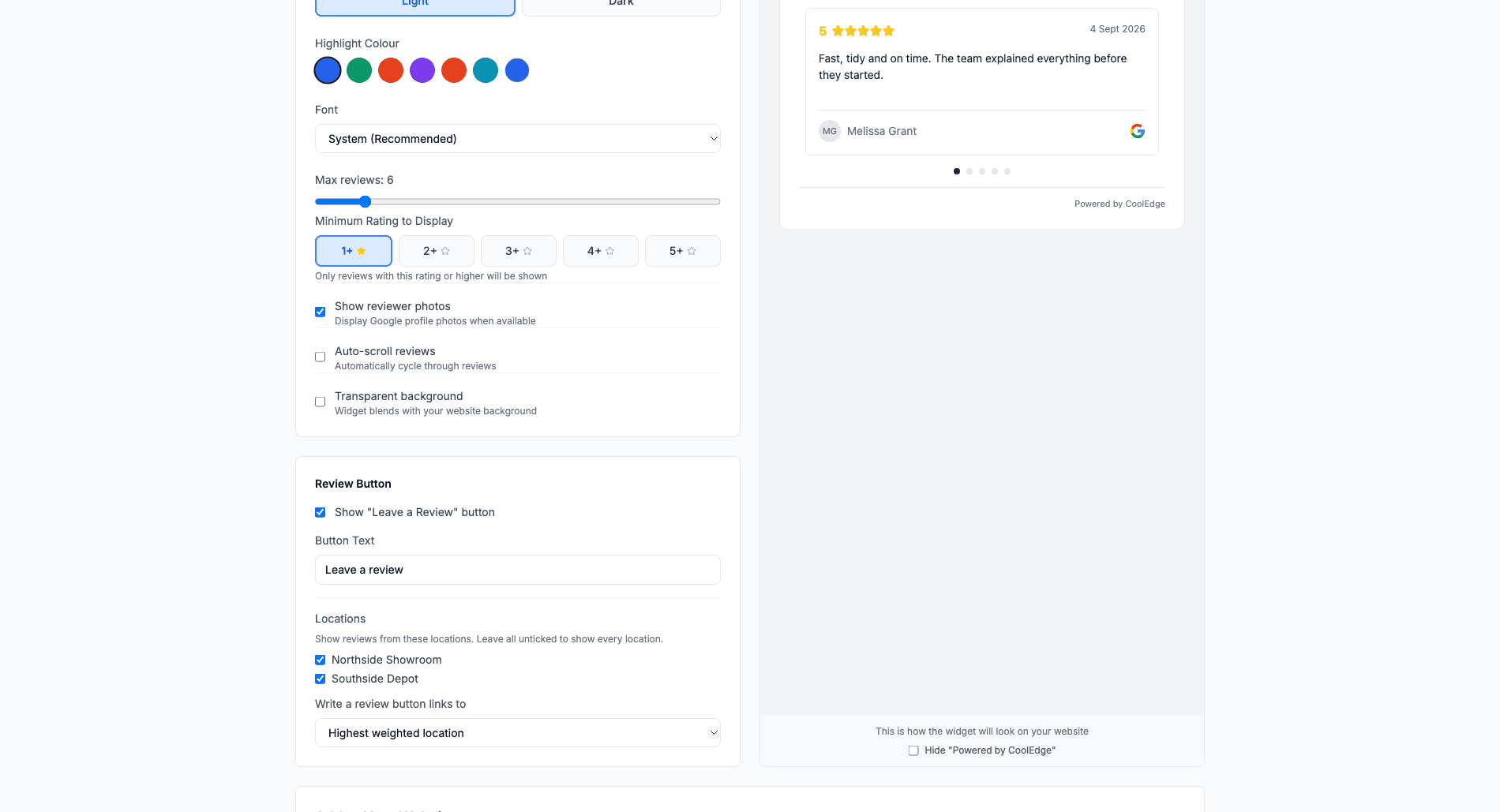
If your Google account has more than one connected location, a Locations control appears under the Review Button settings.
- Tick the locations whose reviews you want the widget to show
- Leave all of them unticked to show every location, which is also what a widget does if you never touch the setting
- The star rating and review count above the reviews are for the locations you picked, not the whole business
- When more than one location is in scope, Write a review button links to decides where the Leave a Review button sends people. Leave it on Highest weighted location and it follows your review link routing, or pick a specific location to pin it
This is how you put a suburb-specific widget on a suburb-specific landing page: one page shows the Brookvale reviews and its Leave a Review button goes to the Brookvale listing.
Quote Page Widget
Display reviews directly on your public quote pages to increase acceptance rates.
Enabling the Quote Page Widget
- Go to Marketing → Reviews
- Click the Quote Page tab
- Toggle Enable on quote pages
- Customise the appearance
Quote Page Widget Options
- Display Style – List or Carousel layout
- Section Heading – Custom text (e.g., "What Our Customers Say")
- Max Reviews – Number to display (3-10 recommended)
- Minimum Rating – Quality filter (4+ or 5-star only)
- Show Photos – Display reviewer avatars
- Locations – Which Google locations the reviews come from, when you have more than one. Leave all unticked to show every location
Once enabled, reviews automatically appear on all your public quote links.
Why Reviews on Quote Pages Matter
Customers are making a buying decision when viewing your quote. Showing reviews at this moment:
- Builds trust before they commit
- Differentiates you from competitors
- Increases acceptance rates with social proof
- Reduces price objections by highlighting value
Widget Styles Explained
Carousel Style
The carousel automatically scrolls through your reviews, one at a time:
- Great for limited space
- Eye-catching animation
- Configurable scroll speed (2-15 seconds)
- Navigation arrows for manual browsing
List Style
All reviews display in a vertical stack:
- Shows more reviews at once
- Better for dedicated testimonials pages
- Easier to scan quickly
- No motion (good for accessibility)
Hiding Specific Reviews
You can hide individual reviews from your widgets:
- Go to Marketing → Reviews → Reviews tab
- Find the review you want to hide
- Click the visibility toggle (eye icon)
- Review won't appear in embedded widgets
Note: This only affects Cooledge widgets, not your actual Google listing. Hidden reviews are still visible on Google.
Troubleshooting
Widget Not Displaying
If your embed widget isn't showing:
- Check embed code – Ensure it's complete and properly placed
- Verify JavaScript – Check browser console for errors
- Review count – Make sure you have reviews to display
- Rating filter – Check min rating isn't hiding all reviews
- Website conflicts – Some page builders need "raw HTML" blocks
Widget Looks Wrong
If styling seems off:
- Theme mismatch – Try switching Light/Dark theme
- Transparent mode – Enable for pages with coloured backgrounds
- Font issues – Check font family setting matches your site
- Container width – Ensure parent element has sufficient width
Reviews Not Updating
The widget fetches fresh reviews when the page loads. If you're not seeing new reviews:
- Wait a few minutes and refresh
- Check that new reviews have synced from Google
- Verify minimum rating filter isn't excluding them
- Clear your browser cache
Related: Automated Reviews & Reputation → | Google Business Profile Integration →
Need help with widgets? Email us at support@cooledge.com.au
Was this article helpful?
Let us know if you found this information useful.
Still need help? Contact support
In this article
Use your browser's search (Ctrl+F) to quickly find specific topics within this article.
Browse all help articles →