
Online Bookings
Turn any form into a self-service booking page. Customers pick a real available time and a confirmed job lands on your calendar with staff assigned, ready for reminders.
Start Free TrialLet customers book you, day or night
Your website visitors want to book now, not wait for a callback. Switch booking on for any Cooledge form and visitors pick from your live availability. Submitting creates a real, confirmed job, not just a lead sitting in an inbox.
- Turn booking on for any lead form, no new tool to learn
- Customers pick from your live availability, not a request to call back
- Every booking creates a lead, a customer and a confirmed job on your calendar
- A staff member is assigned automatically from your pool
- A confirmation email with a calendar invite goes out, with reminders already queued
- Out-of-area visitors become an enquiry, not a job you cannot reach
ABC Plumbing & Air
Book a visit
Booking confirmed
Job #1042 · Mike assigned
Arrive between 9am and 10am
A booking that does the admin for you
Everything a self-service booking should do, wired into the calendar and reminders you already use
Live Availability
Slots are worked out against your real calendar, so customers only ever see times a staff member is genuinely free. Set hours per day, minimum notice, how far ahead people can book, buffers and a daily cap.
A Confirmed Job
Submitting books a real job on your schedule with staff assigned. Reminders, the mobile app and your reporting all work from day one, not just a lead sitting in an inbox.
Service Areas
Set the postcodes or a radius you cover. Visitors outside your area are routed to an enquiry, so you never get booked for a job you cannot reach.
Arrival Windows
Show customers a window like "between 9 and 11am" or Morning and Afternoon in confirmations and reminders instead of an exact time. Your calendar still holds a precise block.
How It Works
From a form on your website to a booked job on your calendar
Build a Booking Form
Turn booking on for a form and add your services with real durations. One service or a menu, your call.
Set Your Availability
Choose your hours, your staff pool and the postcodes or radius you cover. Customers only see times you can make.
Share It Anywhere
A hosted page, an embedded widget, a landing-page section or a tracked short link. Whatever suits your marketing.
They Book, You Show Up
A confirmed job lands on your calendar with staff assigned, a confirmation sent and reminders queued.
Set it up in your dashboard
Build the whole form with a live preview beside you, so you always see exactly what your customer will
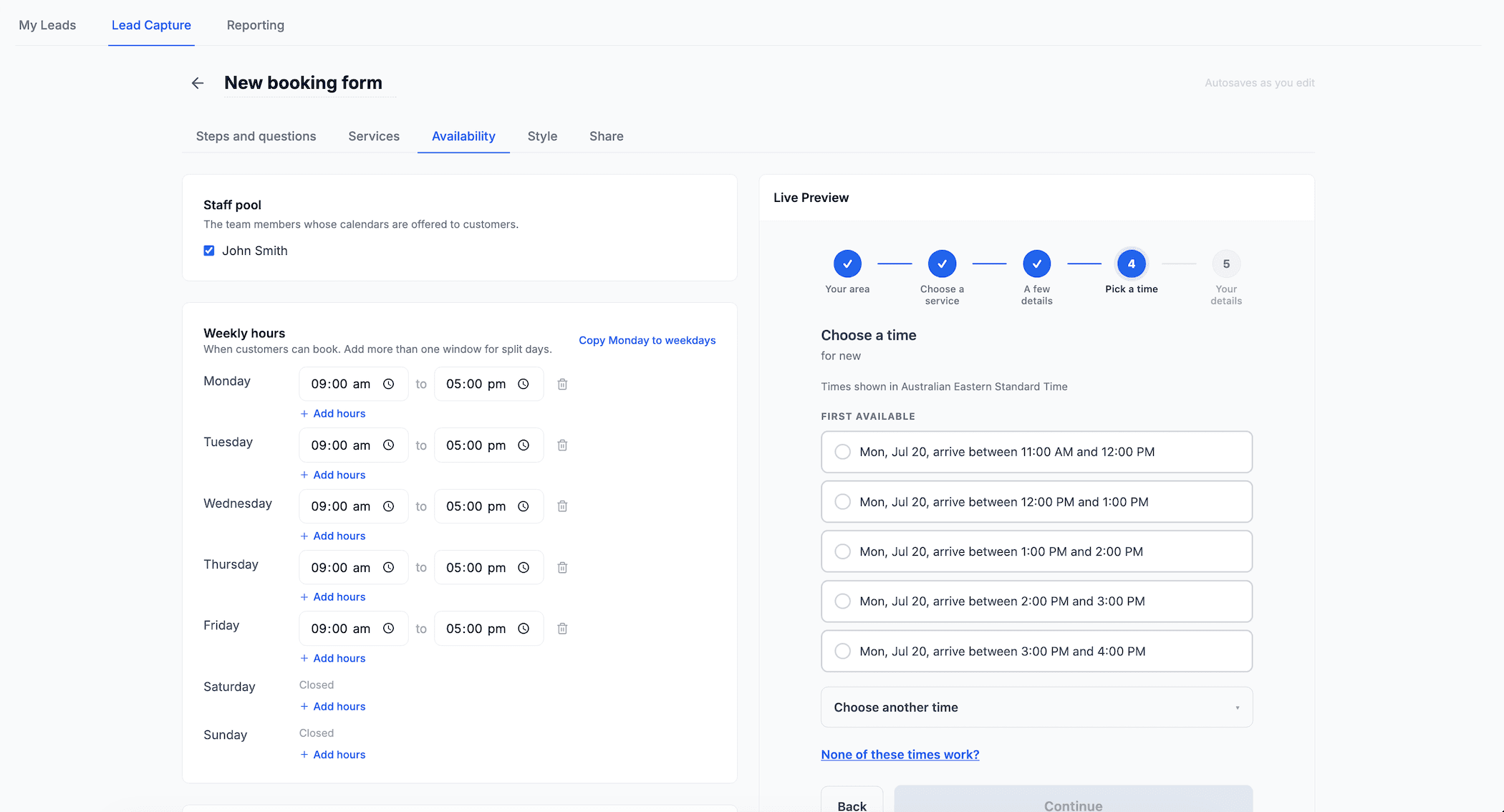
Availability that reflects your real week
Pick the team members whose calendars are offered, set your hours per day and add split windows where you need them. Notice, buffers, a daily cap and your arrival window all live here too.
The live preview shows the exact time slots your customer will see, arrival windows and all, so there are no surprises once you go live.
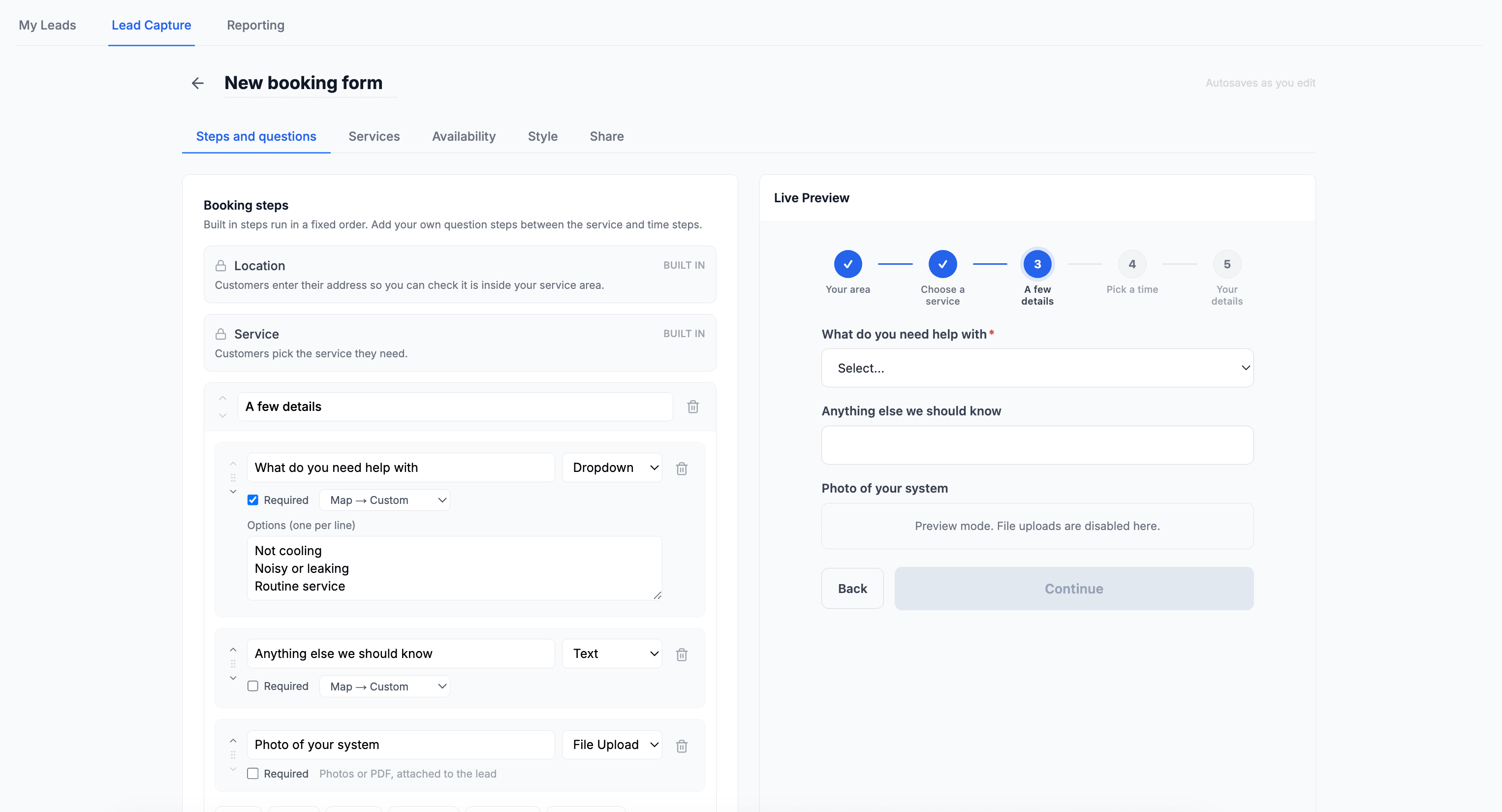
Ask the right questions up front
Location and service steps are built in. Between them, add your own question steps with dropdowns, text and file uploads, so a photo of the switchboard or the model plate arrives before you do.
Every answer maps onto the lead, so your team has the full picture the moment the booking lands.
Built for the way trades actually book
The details that turn a booking form into a booking system you can trust
Multi-Step Qualification
Split your questions across a few tidy screens instead of one long page, so customers give you what you need before they pick a time.
Photo & Document Uploads
Ask for a photo of the switchboard or the unit model plate before you arrive. Images and PDFs attach straight to the lead.
Per-Service Staff Pools
Send Quote Visits to your estimators and licensed work to specific team members. Each service can use its own pool or the form default.
Never a Dead End
When nothing suitable is free, the customer leaves their preferred days and times as an enquiry, so a full calendar never costs you the lead.
Book From Anywhere
A hosted page needs no website, the widget embeds inline on your site, and a booking section drops onto any landing page.
Track the Money, Not Just Clicks
Every booking is tagged with the channel, campaign and exact ad that brought it in, with Google and Facebook click IDs. Because a booking is a real job you win and invoice, you can trace booked work back to the ad that produced it, with channel and campaign breakdowns in your leads report.
Conversion tracking built in
Send every booking and lead to Google Analytics, Google Ads and Meta, with server-side events that keep counting even when a browser blocks the pixel. Optimise your ad spend against customers who actually book. Set it up →
Online Bookings is available on Growth and Scale plans.
Works Even Better With
Online Bookings builds on the tools you already use to win and run work
Ready to streamline your business?
Try free for 14 days. Create professional quotes and manage jobs in minutes.
Cancel anytime.